How Do You Hand Off Local Listings Management Wins in a Client Retainer Review?
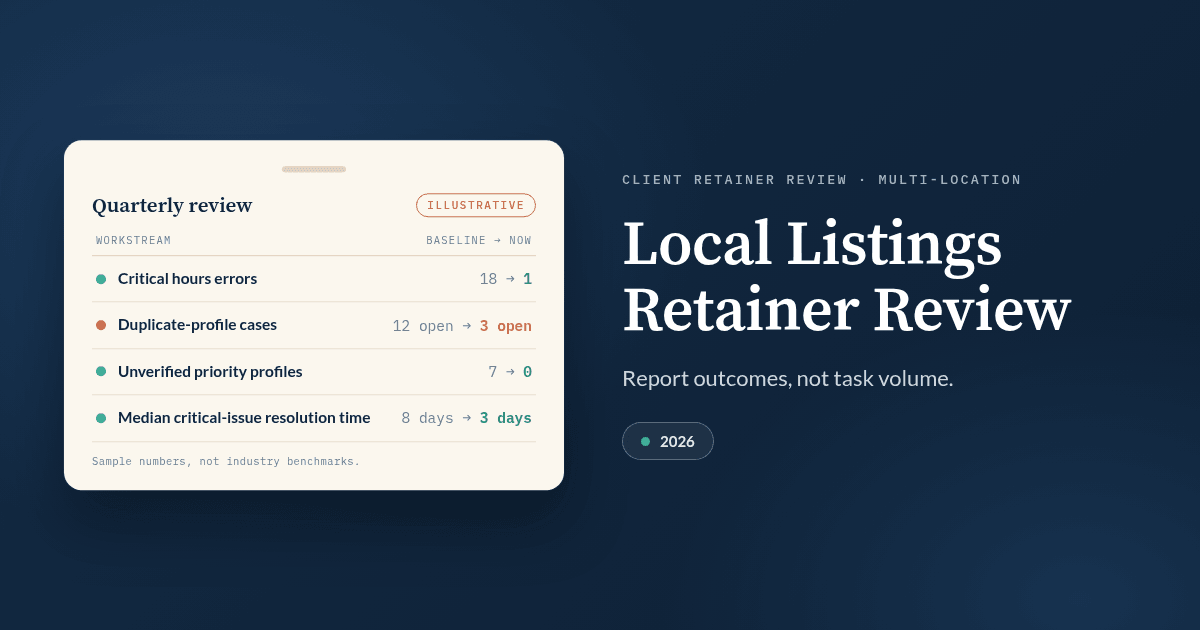
To hand off local listings management wins in a client retainer review, present each win as a verified before-and-after record: the original problem, the work completed, proof that the public listing changed, the customer signal and any business outcome that followed, and the next action. The review should answer four questions: What changed? How do you know it changed? What customer or business signal followed? What should happen next?
Agencies often weaken the review by spending too much time on production counts. “We updated 186 listings” shows activity. It does not tell the client whether inaccurate hours were fixed, duplicate locations disappeared, the client regained control of priority profiles, customers found the right phone number, or the business generated more calls and bookings.
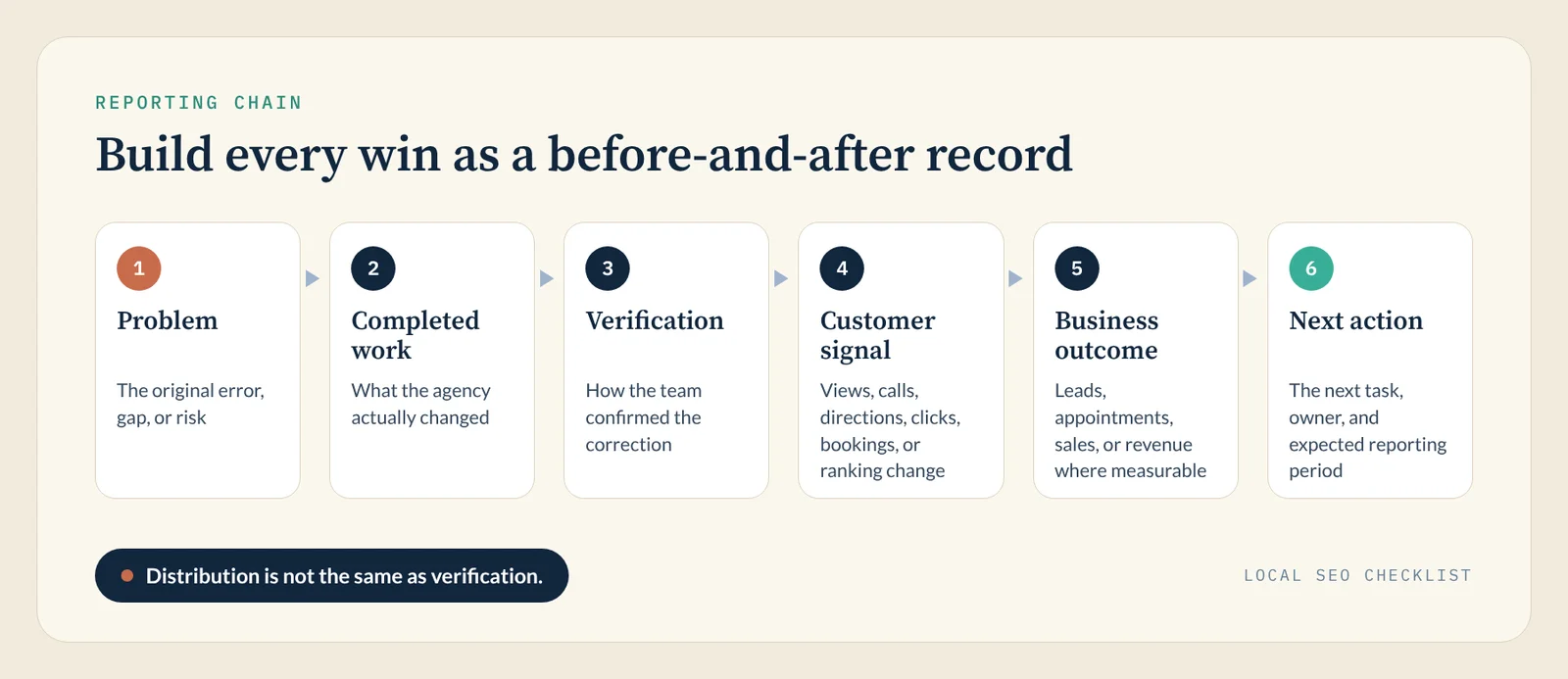
A stronger review follows a simple reporting chain:
Problem → completed work → verification → customer signal → business outcome → next action
Google says that complete and detailed Business Profile information helps it understand how relevant a business is to a search. The same help page says local results are mainly based on relevance, distance, and prominence (its summary line now calls the third factor “popularity”). Complete, accurate listings therefore support local discovery, but they do not guarantee a Map Pack position.
For the operating work that happens before the client meeting, use our monthly local listing management checklist, which covers source-of-truth data, priority platforms, duplicate suppression, owners, severity, and reporting.
Key takeaways
| Principle | What to do in the retainer review |
|---|---|
| Report outcomes, not task volume | Replace “186 listings updated” with the customer-facing problems resolved |
| Separate metric types | Keep operational health, visibility, engagement, and revenue distinct |
| Show the baseline | Compare the current condition with the problem the client originally hired you to solve |
| Keep attribution conservative | Calls, clicks, and directions are useful signals, but they are not automatically revenue |
| Surface exceptions | Show the locations, platforms, or approvals still blocking progress |
| End with the next cycle | Explain what the next 30 to 90 days of the retainer will address |
What counts as a local listings management win?
A local listings management win is a verified improvement to the client’s public location presence.
That may mean correcting an old phone number, fixing holiday hours, reflecting a relocation, verifying a new store, resolving a duplicate, completing missing listing fields, correcting categories, restoring a disconnected publisher connection, or making location data consistent across priority platforms.
The agency should be able to prove each important change against an approved location record.
For example, saying “hours were updated” is weak reporting. A stronger handoff says that 24 priority profiles were showing outdated Sunday hours, the approved hours were corrected in the location master, the changes were distributed, and all 24 profiles were checked again after publication.
That last step matters. Distribution is not the same as verification.
For broader guidance on managing listings across Google, Apple, Bing, directories, and large location portfolios, see our guide to local listings management in 2026.
Start the retainer review with the client’s original problem
Your client should understand the baseline before seeing the current metrics.
Suppose a 150-location brand entered the quarter with inconsistent store hours, unresolved duplicates, unverified profiles, and no reliable system for identifying location-level errors.
The opening section of the retainer review could say:
Illustrative example: At the start of the quarter, 29 of 150 locations had at least one material listing problem. Across those locations, the audit found 18 critical, customer-facing hours errors, 5 phone or URL problems, 7 unverified priority profiles, and 12 unresolved duplicate-profile cases. This quarter focused on reducing high-risk errors and shortening the time needed to identify and correct them.
Every slide or report section that follows should connect back to that starting point.
If the original objective was listing accuracy, the agency should not quietly change the success measure to rankings at renewal time. If the agreement included qualified lead growth, however, reporting only citation submissions is also insufficient.
The review should use the measurement standard the client agreed to.
Use four layers of local listings reporting
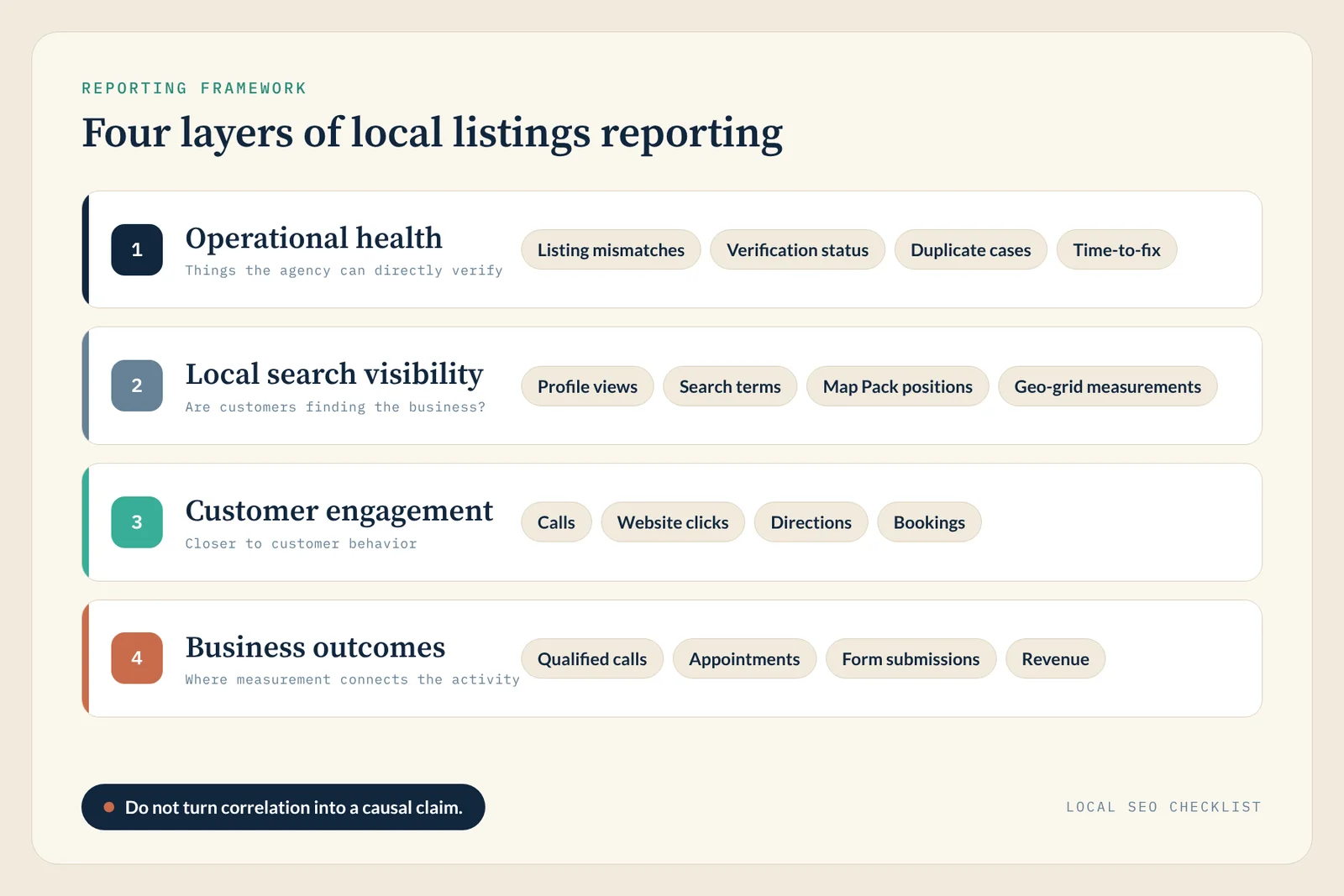
A clear local listings management reporting framework separates operational health, search visibility, customer engagement, and business outcomes.
1. Operational health
Operational health covers things the agency can directly verify.
Useful measures include listing mismatches, priority-profile accuracy, open critical issues, verification status, duplicate cases, locations updated, publisher connection failures, update completion, and time-to-fix.
For multi-location accounts, include both a portfolio number and an exception view.
“98% of profiles are accurate” sounds strong, but it can hide three high-volume locations displaying a disconnected phone number. Show the 98%, then name the remaining high-risk locations.
Our monthly checklist takes the same approach: it recommends reporting open critical mismatches and time-to-fix instead of vanity totals. To set realistic time-to-fix expectations, see how long it takes to fix NAP drift.
2. Local search visibility
Visibility asks whether customers are finding the business in local search.
Depending on your reporting setup, useful measures may include Google Business Profile (GBP) views, search terms, local ranking coverage, Map Pack positions, geo-grid measurements, and branded and non-branded search activity.
Because Google ranks local results mainly on relevance, distance, and prominence, a listings cleanup can support relevance and data quality, but competitor activity, reviews, links, website changes, and searcher location can all change at the same time. For the wider set of signals, see our guide to local SEO ranking factors.
Add review count, average rating, and response rate per location. Google says prominence is also based on information such as how many reviews a business has.
If the client cares about AI answers, spot-check a few priority queries in Google AI Mode, ChatGPT, and Perplexity each month and log whether each location’s name, address, phone number, and hours are correct.
Whichever visibility measures you use, do not turn correlation into a causal claim.
3. Customer engagement
Engagement moves the review closer to customer behavior.
Google Business Profile performance can report profile views, searches, calls, website clicks, directions, messages, and completed bookings where the applicable feature is available. Google defines calls as clicks on the call button and directions as people asking for directions. It counts views as unique viewers: a person is counted only once a day, though visits on different devices or platforms can add to the count.
Google still lists a messages metric, but it turned off Business Profile chat on July 31, 2024, so do not build a report section around messages. The searches metric updates at the start of each month and can take up to five days to appear, so pull monthly reports after that window.
Those definitions should control your wording.
- A call-button click is not automatically an answered call.
- A direction request is not a verified store visit.
- A website click is not necessarily a qualified lead.
A good client report states exactly what the metric measures.
4. Business outcomes
Business outcomes include qualified phone calls, appointments, reservations, form submissions, transactions, ecommerce revenue, and store-level revenue where the measurement setup can connect the activity.
Google added a direct Google Business Profile integration to Google Analytics on June 8, 2026. Linked properties can report GBP interactions, calls, bookings, direction requests, website clicks, messages, and menu interactions inside Google Analytics, and Google says these metrics use a rolling six-month window.
This connection can reduce the manual work of putting local-profile data beside website behavior, which helps move the retainer discussion from platform activity toward business performance.
Build every win as a before-and-after record
You can make the client review clearer by using the same evidence fields for each major workstream.
| Field | What belongs here |
|---|---|
| Baseline | The original error, gap, or risk |
| Work completed | What the agency actually changed |
| Verification | How the team confirmed the correction |
| Current status | Resolved, pending, blocked, or recheck required |
| Customer signal | Views, calls, directions, clicks, bookings, or ranking change |
| Business outcome | Leads, appointments, sales, or revenue where measurable |
| Next action | The next task, owner, and expected reporting period |
This structure also makes account management easier because the agency does not need a different storytelling method for duplicates, hours, verification, citation cleanup, or new-location openings.
Sample local listings client report
The sample below is illustrative and continues the 150-location example above.
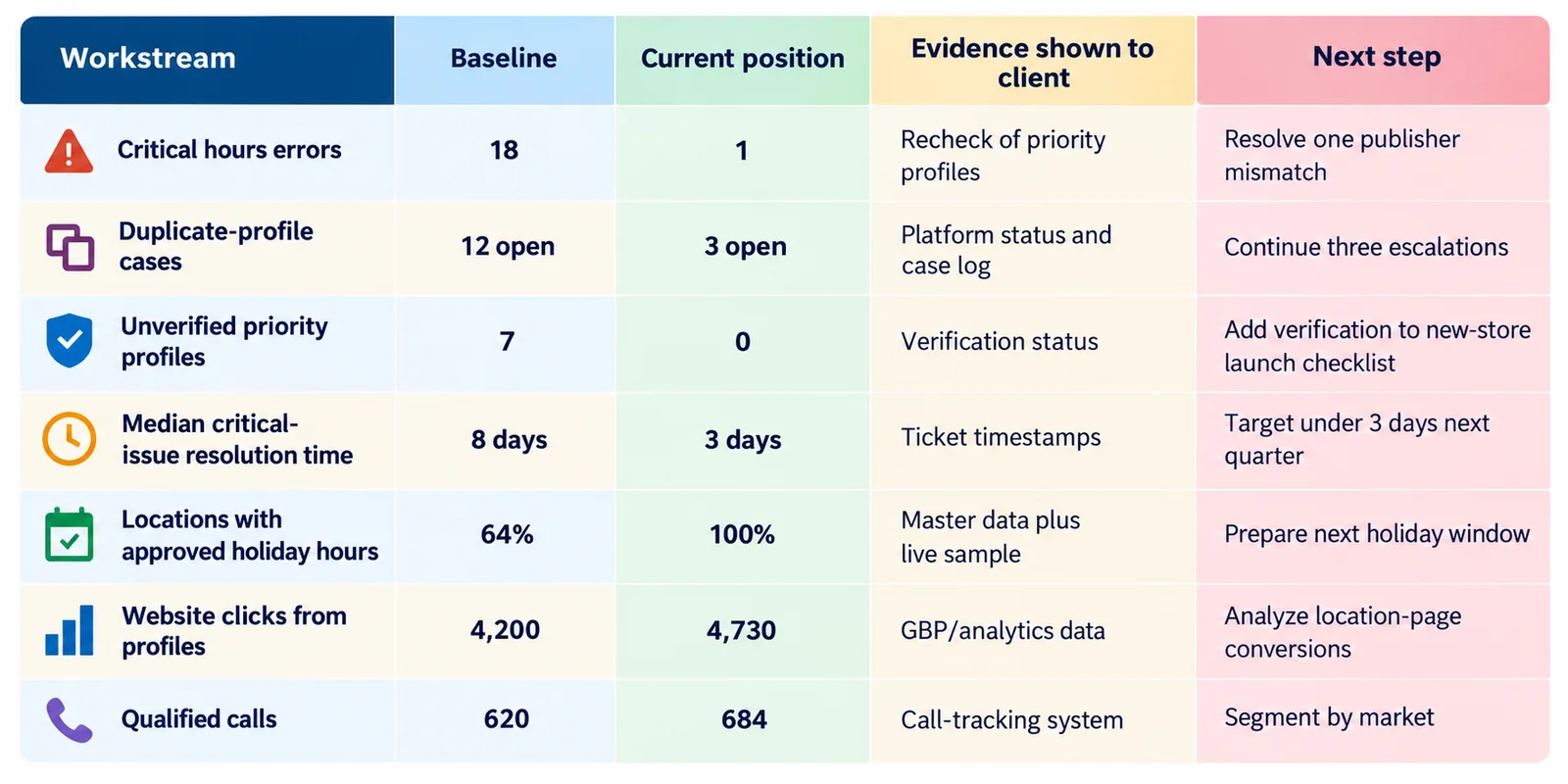
| Workstream | Baseline | Current position | Evidence shown to client | Next step |
|---|---|---|---|---|
| Critical hours errors | 18 | 1 | Recheck of priority profiles | Resolve one publisher mismatch |
| Duplicate-profile cases | 12 open | 3 open | Platform status and case log | Continue three escalations |
| Unverified priority profiles | 7 | 0 | Verification status | Add verification to new-store launch checklist |
| Median critical-issue resolution time | 8 days | 3 days | Ticket timestamps | Target under 3 days next quarter |
| Locations with approved holiday hours | 64% | 100% | Master data plus live sample | Prepare next holiday window |
| Website clicks from profiles | 4,200 | 4,730 | GBP/analytics data | Analyze location-page conversions |
| Qualified calls | 620 | 684 | Call-tracking system | Segment by market |
The strongest row is not necessarily the one with the biggest percentage increase.
If an agency prevents incorrect holiday hours from appearing across 150 stores, the value may be operational risk reduction rather than a direct ranking increase.
Report multi-location accounts at three levels
A 500-location client does not need 500 profile screenshots in a quarterly meeting.
The report should move between the portfolio, logical location groups, and exceptions.
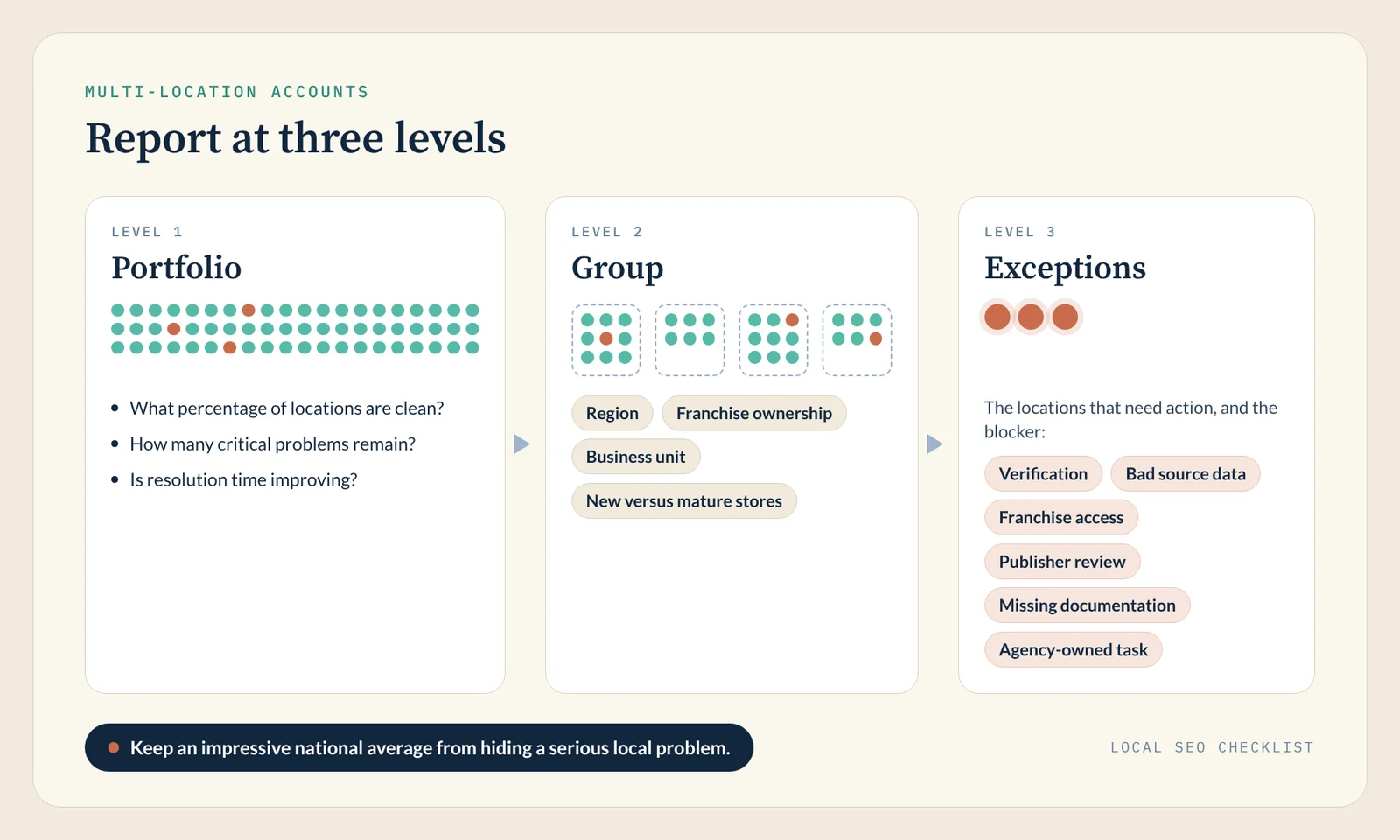
The portfolio view answers questions such as: What percentage of locations are clean? How many critical problems remain? Is resolution time improving?
The group view can segment locations by region, franchise ownership, business unit, new versus mature stores, or another operationally useful cohort.
The exception view identifies the locations that need action.
If 11 stores account for most unresolved issues, show those stores. State whether the blocker is verification, bad source data, franchise access, publisher review, missing documentation, or an agency-owned task.
This keeps an impressive national average from hiding a serious local problem.
Use Google, Apple, Bing, and your website analytics as separate evidence sources
Your listing-management platform should not be the only source in the report.
Google Business Profile
Use Google Business Profile performance for Google-specific customer activity, then use Google Analytics or your conversion systems to understand what happened after a website visit or other measurable action.
One Google Analytics property can link to multiple Business Profiles, but Google says the GBP metrics are then summed across all linked profiles and cannot be segmented or filtered by individual profile. For location-level reporting, keep using Business Profile performance downloads (which can cover multiple profiles in one spreadsheet) or your listings platform, and use the Analytics integration for portfolio-level context.
Apple Business (formerly Apple Business Connect)
Apple announced Apple Business on March 24, 2026, and made it available on April 14, 2026, as a free service that replaces Apple Business Connect, Apple Business Manager, and Apple Business Essentials. Apple said existing Business Connect data, including claimed locations and place card information, would migrate automatically at launch. According to Apple, Apple Business location insights show how customers discover and interact with locations on Maps, including search, views, and taps on actions.
Use this data when Apple Maps is material to the client’s customer journey. Do not report Google activity as if it represents the entire local discovery market.
Bing Places for Business
Microsoft directs businesses to Bing Places for Business to claim or update their business information in Bing Maps. Bing’s help center says the service supports local, small, and chain businesses, and that linking a Google Business Profile account imports its listings, with later Google changes updating Bing at the next sync. The redesigned Bing Places experience, which moved to bing.com/forbusiness in October 2025, also added bulk editing.
If the client’s Bing listings are synced from Google, fix the Google data first. For setup steps, see our Bing listing checklist.
Bing Places’ partner API documentation describes weekly impression data for published businesses, with the last 12 weeks returned by its analytics endpoint. That API is built for listing partners, so many agencies will see Bing data through a listings platform that connects to Bing.
For many agency reports, Bing belongs primarily in the operational-health section unless the account has enough Bing activity to justify a separate performance view.
Data Studio (formerly Looker Studio) as the presentation layer
Data Studio, which Google renamed from Looker Studio in April 2026, can serve as the presentation layer when an agency needs to combine multiple reporting sources.
Google defines a connector as the mechanism by which Data Studio accesses a specific data platform, system, or product, such as Google Analytics, Google Sheets, or BigQuery. Reports then draw on the data sources built from those connectors.
A practical agency setup might put listing-operation exports, Google Analytics 4 (GA4) data, call tracking, CRM results, and location-level status information into one client-facing dashboard while keeping the original platforms as the source of record.
How should the retainer meeting itself be structured?
Follow the same order as the report: objective and baseline, work completed, operational health, visibility and engagement, business results, and the next 30 to 90 days. The agenda below totals 40 minutes, which fits a 45-minute meeting with time for questions. For a 30-minute meeting, cut the three 8-minute sections to about 4 minutes each.
| Time | Section | Purpose |
|---|---|---|
| 5 minutes | Objective and baseline | Re-establish what the retainer was hired to improve |
| 8 minutes | Work completed | Show the highest-value changes, not every ticket |
| 8 minutes | Operational health | Accuracy, duplicates, verification, blockers, and time-to-fix |
| 8 minutes | Visibility and engagement | Search presence, calls, clicks, directions, and bookings |
| 6 minutes | Business results | Leads, appointments, sales, and revenue where measurable |
| 5 minutes | Next 30 to 90 days | Confirm priorities, owners, dependencies, and the next review |
If a client has not had a listing audit yet, our 15-minute local SEO audit is a quick way to surface basic profile and citation issues before the first review.
Which tools can support the reporting workflow?
Listings platforms such as BrightLocal, Moz Local, Semrush Local, Synup, Uberall, and Yext can supply much of the operational and visibility evidence, but software supports the reporting process; it does not replace it. If your main goal is choosing a platform, see our 2026 buyer’s guide to local listings management tools.
The platforms below are listed alphabetically, not ranked. Each entry covers reporting fit, one limitation, and published pricing as of October 1, 2026.
| Platform | Reporting fit | Limitation to check | Published pricing (October 1, 2026) |
|---|---|---|---|
| BrightLocal | Citation, local rank, and GBP audit reporting, with white-labeling on all plans | Citation Builder is pay-as-you-go; Active Sync is on Manage and Grow only | $41 to $65 per month for one location (monthly billing) |
| Moz Local | Listing health plus Local Grid map rankings | Agency Permissions start on Preferred; the reporting suite is on Elite | $20 to $40 per location per month (monthly billing) |
| Semrush Local | Map rankings beside wider Semrush SEO data | Listing Management is on Pro, not Base | $30 (Base) or $60 (Pro) per location per month (annual billing) |
| Synup | Listings work and a white-label Client App (Premium and up) in one place | The All locations overview refreshes daily | $49 to $899 per month for 1 to 50 locations (monthly billing) |
| Uberall | Portfolio dashboards for large multi-location brands | Analytics Plus and Collaborate Plus (white label) are add-ons | Quote-based |
| Yext | Publisher-level data and governance at scale | Competitive Intelligence is sold separately | Quote-based |
1. BrightLocal
BrightLocal is oriented toward agencies and local SEO teams that need citation tracking, local rank measurement, Google Business Profile audits, listing synchronization (Active Sync, on the Manage and Grow plans), and client reporting. White-labeling is available on all three current subscription plans.
The platform can be useful when a retainer report needs to show citation problems and local ranking information alongside listing-management work.
Limitation: Citation Builder is a separate pay-as-you-go service on every plan, so citation building is not covered by the subscription price. BrightLocal also allocates ad-hoc report runs by the number of active locations (for example, 3 runs a month for one location and 10 for 6 to 10 locations), so agencies with heavy manual-reporting needs should check those allowances.
BrightLocal’s help-center pricing table lists one-location pricing at $41 per month for Track, $54 for Manage, and $65 for Grow on monthly billing, or $369, $485, and $584 per year on annual billing.
Pricing: $41, $54, or $65 per month for one location depending on plan, before Citation Builder or larger location bands.
2. Moz Local
Moz Local supports centralized location management, listing-health reporting, local ranking measurement, and review management. Its reporting suite lets you choose which locations or groups a report includes, and the help center documents a location-level insights dashboard.
Its Local Grid feature (formerly GeoRank) tracks how a business and its competitors rank in Google Maps across a geographic area, with 250 credits per location each month and a leaderboard by location. Together, those views keep operational listing health separate from search visibility and help an account manager move from a portfolio problem to the store or office affected.
Limitation: Agency features vary by tier. Moz’s pricing page lists Agency Permissions from the Preferred plan up and reserves the reporting suite (leads, reviews, social, and custom reports) for Elite, so check the tier before promising a client report format.
Pricing: Lite $20, Preferred $30, and Elite $40 per location per month on monthly billing, or $199, $299, and $399 per location per year on annual billing; Enterprise pricing is custom for 50 or more locations.
3. Semrush Local
Semrush Local can fit agencies that already use Semrush and want local-profile activity and map-ranking data beside broader SEO reporting. Its Local pricing page lists Base at $30 and Pro at $60 per location per month, billed annually. The Business plan, which Semrush positions for businesses with 20 or more locations, uses custom pricing. Listing Management is included in Pro, not Base.
That distinction matters when budgeting a retainer. A $30 Base subscription should not be presented as equivalent to the plan that includes listing distribution.
Semrush’s Map Rank Tracker and reporting functions can support location-level visibility reporting, while the wider Semrush reporting environment can combine local and website SEO data.
Limitation: Costs multiply by location, and agencies that mainly need listing accuracy may pay for broader local or SEO capabilities they do not use. Semrush lists branding and white-labeling under its Pro Report add-on ($20 per month), so budget for it if clients expect branded reports.
Pricing: Base $30 and Pro $60 per location per month on annual billing; Business custom.
4. Synup
Synup combines listings operations with agency-facing client delivery. Its pricing page lists white-labeling on Premium and higher plans, and its settings documentation covers branding for the white-label Client App. Profile Analytics exports a PDF report for a single location or a CSV file for one location or all locations. The Listings Overview flags duplicates and connection issues for each location, and its All locations roll-up ranks the locations needing attention and counts unverified Google profiles.
This makes Synup suitable for agencies that want the same environment to support listings work and the client handoff rather than maintaining a separate reporting portal.
Limitation: Synup’s All locations Listings Overview is served from a daily-refreshed cache, and the company says it is the wrong place to check whether a change you just made has worked. Agencies should use the location-level view when validating a fresh correction.
Synup’s pricing page lists Solo at $49 per month for one location, Premium at $299 for up to 10, Pro at $499 for up to 25, and Scale at $899 for up to 50. Enterprise contract pricing applies above 50 locations. Those are monthly-billing prices.
Pricing: $49 to $899 per month on monthly billing, or $39 to $719 per month on annual billing; verify credits, location capacity, and reseller terms for the intended account.
5. Uberall
Uberall targets larger multi-location brands that need listings, location reporting, review data, local search measurement, and integrations across a broad operating environment. Uberall says its listings product covers more than 150 platforms, and its analytics product supports location comparisons, customizable dashboards, custom reports, and scheduled reporting.
For client-retainer work, that can help an agency show an executive portfolio view and then identify individual locations needing intervention.
Limitation: Some deeper functionality is packaged as add-ons. Uberall’s pricing page lists Analytics Plus (competitive intelligence and industry benchmarking) and Collaborate Plus (white label, SSO, and approval workflows) as add-ons, and it shows “request pricing” rather than public dollar amounts.
That means agencies should scope the reporting requirement before requesting a quote rather than assuming every dashboard or analytical function belongs to the base listings package.
Pricing: Quote-based; confirm Analytics Plus, Collaborate Plus, and any other required add-ons in the proposal.
6. Yext
Yext suits organizations that need centralized listing operations, publisher-level data, location governance, and configurable reporting across large location groups. Its Listings page says it has more than 200 direct publisher integrations and tracks impressions, clicks, calls, and directions by publisher or location. Yext Analytics supports customizable dashboards and report sharing.
For a retainer review, Yext’s Listings reports can supply operational evidence such as listings live, listings updated, duplicates suppressed, publisher suggestions, listings accuracy, and listing actions.
Limitation: Competitive reporting requires the separately purchased Competitive Intelligence feature, so agencies should confirm which reporting functions exist in the contracted package. Yext does not publish a standard per-location price; its fiscal 2026 Form 10-K describes packages priced by feature set and number of managed entities.
Pricing: Quote-based packages priced by feature set and number of managed entities; request a current quote.
What should you leave out of the report?
Remove metrics that cannot answer a client question.
A large update count does not mean much if the client cannot tell whether those updates fixed meaningful problems.
Do not describe a direction request as a store visit. Do not describe a call-button click as an answered call. Do not convert a ranking improvement into revenue without conversion evidence.
Do not hide blocked work, though. An unresolved duplicate, expired connection, pending ownership request, inaccurate master record, or missing client approval belongs in the report because it affects what the agency can do next.
A report that shows blockers makes the renewal conversation easier than one that only shows green numbers.
How should agencies connect listing management to ROI?
Use the strongest measurement chain the client has.
- A basic account may stop at profile interactions.
- A more mature account can connect UTM-tagged listing links to GA4 sessions and conversions. Include a location ID in each Business Profile website link’s UTM parameters so GA4 can separate sessions by location, since the GA4 Business Profile integration shows only combined totals when several profiles are linked.
- A client with call tracking can distinguish call-button activity from qualified conversations.
- A franchise with CRM or booking data may be able to connect local-profile discovery to appointments and revenue.
The reporting language should become stronger only as the evidence becomes stronger.
For agencies choosing software to support this process, our agency local SEO tool framework can help compare operational requirements rather than individual features.
Frequently asked questions
How do you report local listings management results to clients?
Start with operational health: incorrect data fixed, open mismatches, duplicates, verification status, and resolution time. Add visibility and customer actions next. Add leads or revenue only when reliable conversion measurement connects those outcomes to the local journey.
What should a local listings management report include?
Include the original objective, baseline, completed work, verification evidence, current operational health, search visibility, customer actions, unresolved blockers, and the next reporting period’s priorities.
Which local listings metrics should agencies report?
Common metrics include listing accuracy, critical mismatch count, duplicate cases, verification status, locations updated, time-to-fix, profile views, calls, website clicks, direction requests, bookings, rankings, and qualified conversions where available.
How often should agencies review listings performance?
Review listing health monthly, and hold a deeper review each quarter or at renewal. Add extra checks after openings, closures, relocations, rebrands, phone changes, holiday-hours updates, or other major business changes. Our guide to keeping listings accurate after a rebrand or move covers those events.
How do you prove that local listings management is working?
Show the problem before work began, the correction made, proof that the public profile changed, and the subsequent customer or business data. Avoid skipping directly from “citation fixed” to “revenue increased” unless the measurement setup can support the connection.
Can Google Analytics show Business Profile data by location?
Not when several profiles are linked to one property. Google says GBP metrics in Analytics are summed across all linked profiles and cannot be segmented or filtered by individual profile. Use Business Profile performance downloads or a listings platform for location-level reporting.
Should Apple Business and Bing Places data appear in the report?
Include their performance data when those platforms matter to the client’s customers. Apple says Apple Business location insights cover search, views, and taps on actions in Apple Maps. Bing Places listings belong in the operational-health section even when Bing traffic is too small for a separate performance view.
Which reporting tool should an agency use?
Use the tool that fits the existing delivery process. Listings platforms such as BrightLocal, Moz Local, Semrush Local, Synup, Uberall, and Yext can provide operational or performance data. Google Analytics, Data Studio (formerly Looker Studio), call tracking, CRM systems, and booking tools can complete the business-outcome layer.
Final takeaway
A strong local listings management client retainer review should make the agency’s work easy to verify.
Start with the client’s original problem. Show the completed listing corrections. Prove that the public information changed. Separate operational health from search visibility, customer activity, and revenue. Call out unresolved exceptions instead of hiding them. Finish with a specific 30-to-90-day plan.
The software is supporting evidence, not the main story.
The client should leave the meeting knowing what improved, what remains at risk, what the available data actually proves, and what the next retainer period will address.